Stop retyping your dealers' orders.
Orders reach you as WhatsApp messages, e-mails, PDFs and photos of handwritten lists. Katipia reads them, matches every line to your product codes and hands your team an order that's ready to approve. One click, and it becomes an ERP import file.
You try it on your own real orders. We do the setup.“Tomorrow: 10 cases of 1 L ayran, 5 cases of white cheese 500 g, and 2 of the blue-lid 20s.”
Three steps instead of an office full of typing
The reading and matching is the system's job. The decision stays with your team.
Orders arrive, Katipia reads
Who sent it, which products, how many, delivery date, special notes. Messages a dealer sends in pieces are merged into one order.
Your team reviews and approves
Original message on the left, what Katipia understood on the right. Sure lines are green. When it isn't sure, it offers choices instead of deciding for itself.
The order goes to your ERP
Approved orders download as a file you import into your ERP. A Logo Tiger/Go file today; Excel and CSV for anything else; your ERP's own format is built with you in the pilot.
This is the screen your team will use
Real screenshots of Katipia, not a mock-up.
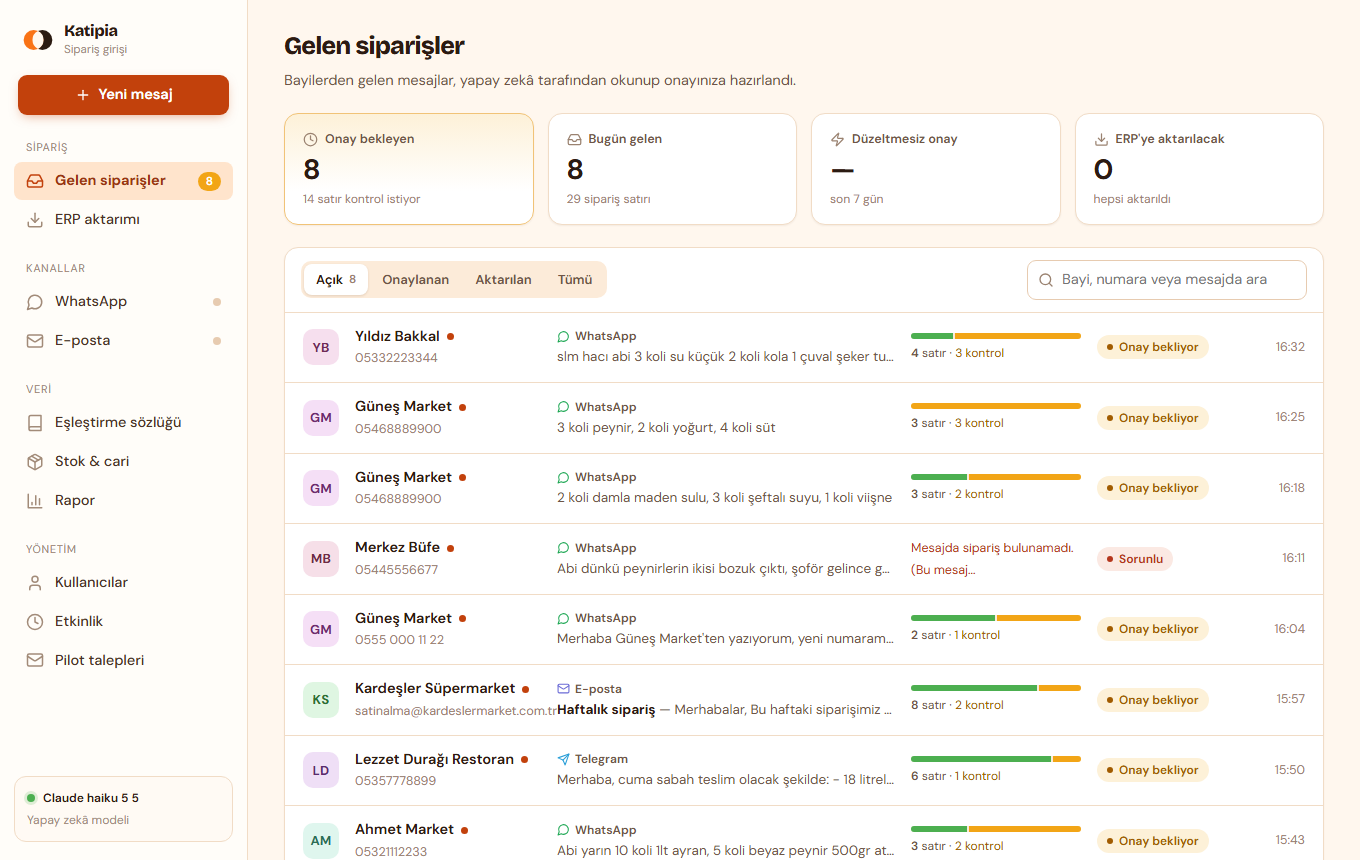
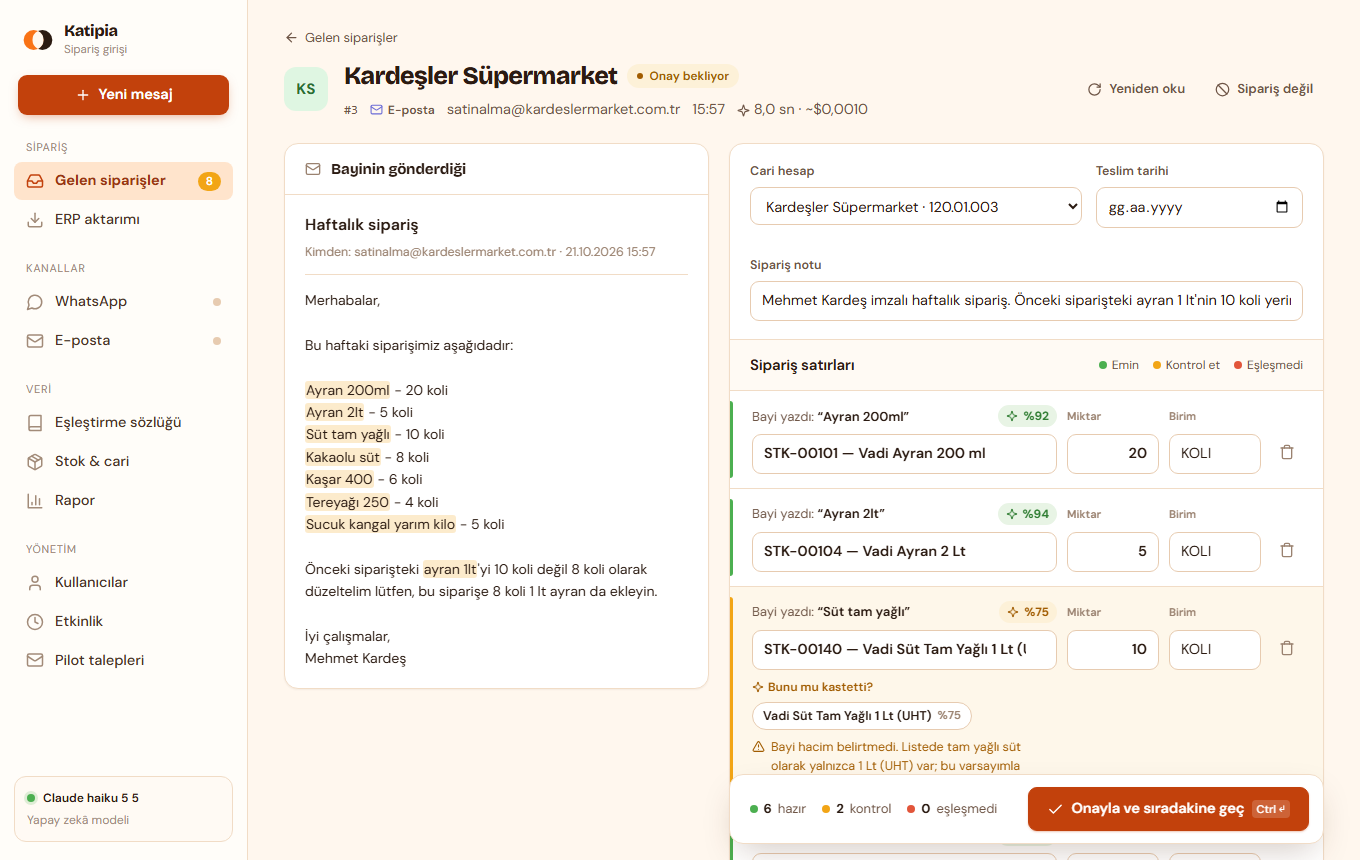
Screenshots use demo data: made-up dealers and a sample catalogue.
“The blue-lid 20”: which product is that?
A dealer never writes your system's product name. Katipia learns the translation your best employee carries in their head.
Learns from every approval
“When Ahmet Market says ‘blue 20’ it means STK-00482.” Confirm it once and that dealer's phrase is matched instantly next time. Over time there is less to check.
Uses each dealer's habits
If a dealer always buys the same size, that is used when the size is missing. A quantity far outside their usual, or a unit that doesn't fit the product, is flagged.
Says so when it isn't sure
The costliest mistake is a wrong product that nobody looked at. So a doubtful match, a line read from a photo, or one that doesn't resemble what the dealer wrote always comes up yellow.
Built so a wrong guess can't slip through
Rules that run independently of the AI check its work.
Nothing reaches your ERP unapproved
Every order is reviewed by a person first. There is no auto-post.
Rule-based second opinion
Unit mismatch, unusual quantity, a likely duplicate order, a match that shares no word with what the dealer wrote: all pushed to “check”.
Photos always get a human look
Handwriting is read, but every line taken from a photo comes up for review next to the photo itself.
Measured on your data
In the pilot we run your past orders through the system and show you the real result before you commit to anything.
Today and tomorrow
Today
- Someone reads messages all day and retypes them into the ERP
- Wrong product, wrong quantity, then returns and extra deliveries
- Morning orders get entered in the afternoon and the shipment slips
- In season you need to hire more people
With Katipia
- Your team checks only the doubtful lines instead of typing
- Every line shows what the dealer wrote next to what the system understood
- Orders are read and ready the moment they arrive
- Busy days, same team, more orders
A 30-day pilot with your own orders
No credit card. You decide at day 30 with real numbers in front of you.
Week 0: your data
You send your product list, customer list and a week or two of real orders. We set everything up.
Week 0: we measure
We run your past orders through Katipia and show you the result on your data. If it's not good enough, we say so.
Weeks 1–2: side by side
Your team keeps entering orders the old way while Katipia reads the same orders. You compare. No risk.
Weeks 3–4: you decide
Katipia becomes the main way and the old way the backup. At day 30 we review time saved and accuracy together.
Questions
What if the AI gets it wrong?
No order reaches your ERP until a person approves it. Doubtful lines come up yellow and your team chooses. In the pilot we measure accuracy on your own past orders and show you; we don't quote a number we haven't measured on your data.
Can it read handwritten lists?
It reads them, but we deliberately mark every line taken from a photo as “check” so your team compares it with the photo. We don't call handwriting reliable enough to pass unchecked.
Which ERP does it work with?
Katipia produces an import file for Logo Tiger/Go, plus Excel and CSV that any ERP can take. For your own ERP (Mikro, Netsis, QuickBooks, SAP B1, Odoo and others) we build the output format with you in the pilot, using a sample import file from your system. We verify the file against your ERP in week one.
How do orders reach Katipia? Which channels are live?
E-mail and Telegram work today: Katipia reads a dedicated order mailbox, so dealers write to that address or your team forwards what it receives (message text plus photo, PDF, Excel and CSV attachments; each e-mail becomes a draft order). Telegram works through a bot your dealers message (text, photos, PDF and Excel files). Anything else can be pasted into the inbox by hand. WhatsApp runs on the official Meta API and is connected to your own number during pilot setup (it needs Meta business verification, which takes some days). We suggest a dedicated order mailbox and number rather than your main ones.
What languages does it work in?
Katipia is built and tested on Turkish-language orders today. Other languages are opened with the first distributors who ask: tell us what your dealers write in and we'll test it on your samples before you commit.
Where does our data go? (GDPR / KVKK)
Messages are sent to an AI service to be read, and that service may be hosted outside your country. Your dealer-facing privacy notice needs to mention it; we provide sample wording. Distributors who need data to stay in-region can discuss a dedicated setup.
What does it cost?
A setup fee plus a monthly fee based on order volume, aimed at staying well below the cost of the person who types orders today. Tell us your daily order count and how many people handle it, and we'll quote you a concrete figure.
Try it on your own orders for 30 days
Send your product list, customer list and a few recent orders. We'll show you the accuracy on your data. No obligation if it's not for you.
Thank you, we got it.
We'll reply to the e-mail address you gave.